
Category Archives: Data Centers
When to Move From Shared Hosting to Colocation
Shared hosting gives businesses an accessible way to launch and maintain a website without buying equipment or managing a physical server. For many smaller websites, it remains a practical and cost-effective choice.
As a business grows, however, its website and applications may demand more performance, security, customization, and reliability than a shared environment can consistently provide. Lightwave Networks helps businesses evaluate those changing infrastructure needs and determine whether colocation services are the right next step.
Moving from shared hosting to colocation is not simply an upgrade to a larger hosting package. Understanding the difference can help you decide whether your business is ready.
What Is Shared Hosting?
With shared hosting, multiple customers use resources from the same physical server. The hosting provider manages the hardware, operating environment, maintenance, and much of the underlying infrastructure.
This arrangement keeps costs and technical responsibilities relatively low. It can work well for informational websites, smaller online stores, blogs, and organizations with modest traffic and standard software requirements.
The tradeoff is limited control. Customers generally cannot choose their own hardware, make extensive server-level changes, or reserve all system resources for their exclusive use.
What Is Colocation?
Colocation allows a business to place its own servers and related equipment inside a professional data center. The colocation provider supplies the physical environment, including power, cooling, connectivity, physical security, and space.
The customer retains control over the hardware and usually remains responsible for its operating systems, software, and configurations. Some colocation service providers also offer managed support for businesses that need help maintaining their equipment.
Signs Your Business May Be Outgrowing Shared Hosting
A slow website does not automatically mean that colocation is necessary. Performance problems can come from inefficient code, oversized images, outdated plugins, poor database maintenance, or a hosting plan that simply needs more resources.
Colocation becomes worth considering when the limitations are broader and more persistent.
Your Performance Needs Are Becoming Predictable and Substantial
Shared hosting distributes server resources among multiple customers. If your business runs high-traffic websites, resource-intensive applications, large databases, or demanding internal systems, that shared environment may no longer provide enough consistency.
Colocation gives your organization dedicated access to the capacity of its own equipment. You can select hardware based on known workloads instead of relying on the limits of a standardized hosting plan.
You Need More Control Over the Hardware
Most hosting services allow customers to choose among predefined plans. Colocation gives businesses direct control over processors, memory, storage, networking equipment, and other hardware components.
That control may matter when your organization needs specialized configurations, proprietary systems, custom appliances, or equipment that a conventional hosting provider does not offer. AI training, GPU hosting, and other compute-intensive workloads may also require dedicated hardware selected for a specific technical purpose.
Security or Compliance Requirements Have Changed
Growing businesses may face stricter requirements involving data access, system configurations, audit documentation, or physical infrastructure.
Shared hosting can provide appropriate security for many websites, but it offers limited control over the underlying environment. Colocation can give an organization more authority over its own systems while placing the hardware in a professionally operated facility.
The right choice still depends on the specific regulation, workload, and security framework involved. Colocation does not create compliance automatically.
Downtime Has Become More Expensive
A small website may tolerate an occasional interruption with limited consequences. An organization that depends on online transactions, customer portals, internal applications, or real-time data may face much greater costs when systems become unavailable.
Colocation facilities are designed to support reliable operations through redundant power, cooling, connectivity, and physical protections. Businesses can also build redundancy into their own hardware and network architecture.
Your Team Can Manage Physical Infrastructure
Colocation transfers more responsibility to the customer than shared hosting does. Your business must be prepared to purchase, configure, monitor, maintain, and eventually replace its equipment.
That does not mean every task must be performed internally. Colocation managed services may provide remote hands, monitoring, maintenance, or other technical support. The business still needs a clear plan for hardware ownership and system administration.
Should You Move to VPS or Dedicated Hosting First?
For many businesses, the answer is yes.
A virtual private server can provide more dedicated resources and configuration flexibility without requiring the customer to own physical hardware. Dedicated hosting provides access to an entire server operated within the hosting provider’s environment.
These options can be appropriate when shared hosting has become restrictive but the business is not ready to purchase and manage its own infrastructure.
Colocation becomes more compelling when hardware ownership, custom configurations, long-term capacity planning, or direct infrastructure control are central requirements. It should solve a defined business or technical problem, not simply serve as the next item on an upgrade ladder.
Questions to Ask Before Choosing Colocation
Before making the move, identify the systems that will be colocated, their current resource use, expected growth, security requirements, connectivity needs, and tolerance for downtime.
You should also calculate the full cost of ownership. Colocation services pricing is only one part of the investment. Hardware purchases, software licensing, technical labor, maintenance, backups, network design, and equipment replacement may also affect the total cost.
A qualified provider can help evaluate cabinet space, power density, bandwidth, redundancy, physical access, remote support, and future expansion needs.
Is It Time to Move Beyond Shared Hosting?
Shared hosting remains useful when a business needs a straightforward, provider-managed environment for a website with standard requirements.
Colocation may be the right fit when your organization needs consistent performance, greater hardware control, specialized configurations, stronger infrastructure planning, and room to scale its physical systems.
Lightwave Networks provides colocation facilities and infrastructure support for businesses with evolving technology needs. Connect with one of our engineers to discuss your current environment and determine whether colocation, dedicated hosting, or another solution fits your next stage of growth.
VPS vs. VDS vs. Colocation: How to Choose for Enterprise Growth
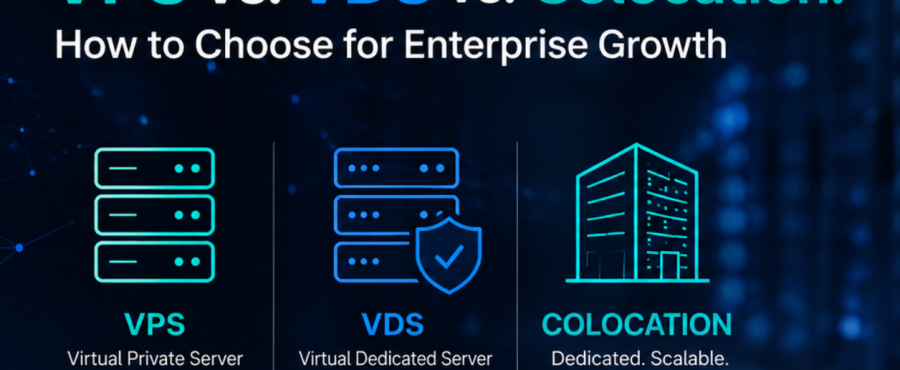
Lightwave Networks helps businesses evaluate infrastructure options that can support performance, control, and long-term scalability. For many growing organizations, that evaluation starts with a simple question: should the business use a VPS, move to a VDS, or consider colocation?
A virtual private server can be useful when a company needs flexible hosting without managing physical hardware. A virtual dedicated server may be a better fit when the business needs more predictable virtual resources. Colocation becomes more relevant when growth requires dedicated hardware, stronger control, private networking, or a data center environment built around long-term infrastructure planning.
What Is a VPS?
A VPS, or virtual private server, is a virtualized server environment created from part of a physical server. It gives the customer access to allocated resources and administrative control, while a provider manages the underlying hardware.
VPS hosting can work well for websites, applications, and business systems that need more control than basic shared hosting. It is often practical when a company wants hosting flexibility without purchasing or managing physical hardware.
The limitation is that a VPS still depends on the provider’s virtualized infrastructure model. Performance, resource allocation, and scalability can vary by plan, configuration, and provider design. For systems that need predictable performance, a VPS may eventually feel restrictive.
What Is a VDS?
A VDS, or virtual dedicated server, is also virtualized, but it is usually positioned around more dedicated resource allocation. In many provider models, a VDS gives the customer reserved CPU, RAM, storage, or bandwidth resources that are less affected by other users on the same physical infrastructure.
That makes a VDS useful when a business wants the deployment advantages of virtualization but needs more predictable performance than a basic VPS plan may provide. A VDS may fit heavier applications, production systems, or business workloads where resource consistency matters.
The tradeoff is that a VDS still keeps the business inside a provider-controlled virtual environment. It can offer more consistency than a VPS, but it does not provide the same hardware ownership, physical access, or infrastructure control that colocation can support.
How Is Colocation Different?
Colocation is different because the business owns or controls the physical hardware and places it inside a third-party data center. The colocation provider supplies the facility environment, including space, power, cooling, security, network access, and support options.
For enterprise growth, colocation becomes relevant when infrastructure needs move beyond renting virtual resources. A business may need dedicated hardware, predictable performance, compliance control, specialized equipment, private networking, or long-term cost planning around physical assets.
Colocation is not automatically the right choice for every growing company. It creates more responsibility because the organization must plan, own, and maintain its hardware. However, it can be a stronger fit when control, durability, and infrastructure customization matter more than virtual-server convenience.
VPS vs. VDS vs. Colocation: What Should Businesses Compare?
The clearest comparison starts with the workload. If the business needs fast deployment, modest control, and flexible hosting for standard applications, a VPS may be enough. However, if it needs stronger resource consistency but still wants a virtualized environment, a VDS may be more appropriate. Also consider if it needs control over physical infrastructure, as colocation may be the better long-term model.
Performance is one of the biggest decision points. VPS performance depends on the provider’s resource allocation and shared-hardware design. VDS hosting is generally built to provide more predictable virtual resources. Colocation gives the business direct control over the hardware profile, which can support workloads that need dedicated compute, storage, or network architecture.
Scalability also looks different across the three models. VPS hosting can scale by changing plans or adding instances. VDS hosting can scale through larger virtual resource allocations. Colocation scales through physical infrastructure planning, including rack space, power capacity, bandwidth, cross-connects, and hardware expansion.
Operational responsibility is another key difference. VPS and VDS models shift more infrastructure management to the provider. Colocation gives the business more control but requires more planning around equipment, lifecycle management, and technical support.
How Does Enterprise Growth Affect the Decision?
Enterprise growth means a company is moving toward more sustainable, scalable operations. That can include revenue growth, new markets, larger customer bases, more complex applications, stronger security requirements, or more demanding internal systems.
A hosting model that works during an earlier stage may not support the next stage well. A VPS may be practical when the priority is speed and cost control. A VDS may help when workloads need more predictable resources. Colocation may make sense when the business needs dedicated infrastructure for long-term performance, compliance, networking, or operational resilience.
A company should choose the model that matches the current workload and the next phase of growth. Waiting too long can create performance limits, migration pressure, or infrastructure risk.
Choosing the Right Infrastructure Path
A VPS, VDS, and colocation data center each support a different stage of infrastructure growth. VPS hosting offers accessible virtual-server flexibility. VDS hosting can provide a more dedicated virtual-resource model. Colocation services support businesses that need physical infrastructure in a secure, professionally managed data center environment.
Lightwave Networks provides colocation services, cloud servers, VPS servers, and related infrastructure services for businesses evaluating how their systems should scale. If your organization is comparing VPS, VDS, and colocation options, start with the workload, control requirements, performance needs, and growth plan. Contact one of our engineers to discuss an infrastructure path that fits your next stage of growth.
VPS, VDS, and Colocation FAQs
What is the difference between VDS and VPS?
The main difference between VDS and VPS is resource allocation. A VPS uses allocated resources on shared physical infrastructure. A VDS is typically positioned with more reserved resources for more predictable performance.
Is colocation better than a VPS?
Colocation is not automatically better than a VPS. It is better suited for businesses that need physical hardware control, predictable infrastructure, private networking, or long-term data center capacity.
When should a business move from VPS to colocation?
A business may consider moving from VPS to colocation when virtual hosting no longer provides enough control, consistency, compliance support, or infrastructure flexibility.
RELATED READINGS:
Colocation Pricing Models Explained: Space, Power, and Bandwidth Costs
Colocation for Data Center Compliance, Security, and Performance
Organizations in regulated and data-intensive industries need infrastructure that supports security, reliability, performance, and control. As those requirements become more complex, maintaining critical equipment in an office server room or private facility may no longer be practical.
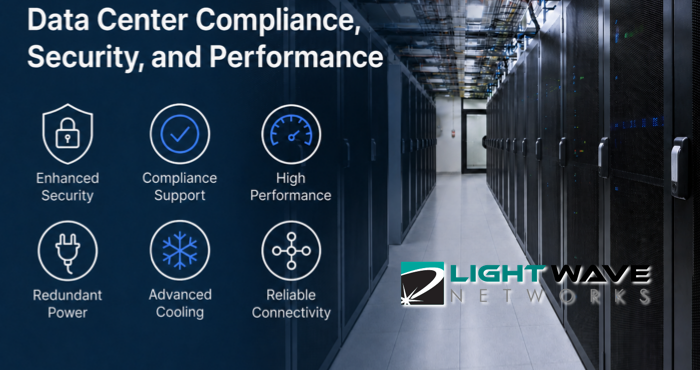
Colocation allows an organization to own and manage its servers while placing them inside a professional data center. Lightwave Networks provides the power, cooling, connectivity, physical security, and facility support needed to operate that equipment.
For some organizations, colocation supports data center compliance efforts. For others, it provides the capacity and flexibility required for specialized or high-performance workloads.
How Colocation Supports Compliance and Performance
Colocation does not make an organization compliant with a law, regulation, or industry standard. Compliance also depends on system configurations, software security, access permissions, data handling, documentation, vendor relationships, and internal procedures.
A colocation facility can support those efforts through controlled physical access, secure cabinets, monitored environments, redundant infrastructure, and documented operating practices. Organizations should confirm which standards a facility supports and how responsibilities are divided between the provider and customer.
Colocation also gives customers direct control over their hardware, storage, networking, and system architecture. This flexibility is valuable when standardized hosting or cloud plans cannot meet a workload’s configuration, latency, power, cooling, or capacity requirements.
Financial Services
Banks, payment processors, investment firms, insurance companies, and financial technology providers depend on systems that process sensitive information and support time-sensitive transactions.
Colocation for financial services firms can provide a controlled environment for transaction platforms, customer records, risk-management systems, and other critical equipment. Redundant connectivity and power infrastructure can also help organizations reduce the operational risks associated with an outage.
Financial organizations may need to address PCI DSS requirements, audit obligations, cybersecurity controls, and record-retention policies. A provider’s facility controls and documentation can support those programs while the financial institution remains responsible for its own systems, applications, and governance.
Healthcare and Health Technology
Healthcare providers, laboratories, medical software companies, and health technology platforms may process protected health information across clinical, billing, imaging, and administrative systems.
Colocation can give these organizations greater control over where their hardware is located and who can physically access it. A professionally managed facility can also offer more dependable power, cooling, and environmental monitoring than equipment housed inside a medical office or administrative building.
Healthcare organizations should confirm whether a provider can support their HIPAA-related requirements, including any necessary agreements, documentation, security measures, and operational procedures.
E-Commerce and Payment Platforms
Online retailers and payment platforms need infrastructure that can remain available during seasonal demand, promotions, product launches, and sudden traffic increases.
Colocation lets these businesses select server, storage, and network configurations based on transaction volume and application requirements. They can also design redundant systems that reduce dependence on a single server, connection, or piece of equipment.
Businesses that store, process, or transmit payment-card information must consider how their infrastructure supports PCI DSS requirements. The facility can help protect the physical environment, while the business remains responsible for areas such as application security, access controls, and payment-data handling.
Software, SaaS, and Digital Platforms
Software companies and SaaS providers need reliable infrastructure for customer applications, databases, development environments, and production workloads.
Colocation can benefit established platforms with predictable demand, specialized configurations, or hybrid infrastructure strategies. These companies can retain control of core systems while connecting colocated equipment with cloud resources, dedicated servers, or other environments.
Carrier options, network capacity, scalable cabinet space, and low-latency connectivity may be especially important for platforms serving customers across multiple markets.
Artificial Intelligence and High-Performance Computing
AI training, analytics, engineering simulations, scientific computing, and other high-performance workloads can require dense deployments of GPUs and specialized servers.
These systems often use more power and generate more heat than conventional business equipment. Colocation for high-performance computing therefore requires careful planning around power density, cooling, network capacity, hardware dimensions, and future expansion.
GPU colocation and AI server colocation also allow organizations to select and own the equipment used for their workloads. This can provide more control over hardware availability, data placement, workload scheduling, and long-term infrastructure costs than relying entirely on rented cloud capacity.
Manufacturing, Engineering, and Industrial Technology
Manufacturers and engineering organizations increasingly depend on automation systems, connected equipment, design applications, digital twins, analytics, and operational data.
Some of these systems need consistent processing and dependable connectivity between production facilities, remote users, and centralized infrastructure. Colocation can provide a stable location for proprietary servers, storage systems, and network equipment without requiring the organization to build its own data center.
It can also support equipment or configurations that do not fit neatly within standard cloud or hosting services.
Legal and Professional Services
Law firms, accounting practices, consulting companies, and other professional-services organizations manage confidential client records, financial information, intellectual property, and litigation materials.
These businesses may choose colocation when they want to retain control over critical systems while improving physical security and infrastructure reliability. Moving equipment out of a typical office can reduce exposure to inadequate cooling, localized power failures, theft, and accidental damage.
The organization should still evaluate whether it has the technical resources needed to manage its hardware or whether it needs additional monitoring, maintenance, or remote support.
Choosing Colocation for Your Industry
The right colocation environment depends on the workload, compliance obligations, technical capabilities, and growth plans of the organization using it.
Before selecting a provider, evaluate its physical controls, power and cooling capacity, connectivity, redundancy, certifications, support options, and ability to accommodate future equipment. Organizations with regulated data or specialized hardware should also document which responsibilities belong to the facility provider and which remain with their internal teams.
Lightwave Networks works with organizations across regulated and data-intensive industries. If your organization is planning for stricter compliance requirements, higher-performance workloads, or long-term infrastructure growth, a consultative infrastructure assessment can help identify the right colocation environment.
We provide colocation services for organizations that need secure facilities, customizable infrastructure, and support for regulated or high-performance environments. Connect with one of our engineers to discuss your data center compliance responsibilities, workload requirements, and infrastructure goals.
Colocation Pricing Models Explained: Space, Power, and Bandwidth Costs
Colocation pricing can be difficult to compare because the monthly rate is rarely based on one factor alone. A colocation facility may quote space, power, cooling, bandwidth, security, support, and connectivity in different ways. For businesses evaluating services, the goal is not simply to find the lowest monthly cost. The better question is whether the pricing model matches the way the infrastructure actually operates. Below, Lightwave Networks explains different factors related to colocation and pricing.
What Drives Colocation Pricing?
Colocation is the practice of placing company-owned servers or networking equipment inside a third-party data center. The organization keeps control of its hardware and systems, while the facility provides the physical environment needed to keep that equipment operating.
Most pricing models begin with the amount of space required, then adjust based on power capacity, power usage, bandwidth, cross-connects, support, contract length, redundancy requirements, and managed services. A low entry price may not include enough power, bandwidth, support, or expansion room. A higher base price may be more practical if it includes the infrastructure capacity the business will actually need.
Space Pricing
Colocation space pricing usually depends on how much physical room the customer needs inside the facility. Smaller deployments may be priced by rack unit, while larger environments may use a half cabinet, full cabinet, cage, or private suite model.
A rack-unit model can work for a business that only needs one or a few servers. A cabinet, cage, or suite model may be more appropriate when the deployment includes multiple servers, network appliances, storage devices, compliance needs, or future expansion plans.
Power Pricing
Power is often one of the biggest variables in data center colocation pricing because it affects both capacity and facility operations. Servers need reliable power delivery, power distribution, cooling support, and redundancy appropriate to the workload.
Some providers price power as a committed amount of capacity, while others may account for actual usage, blended power, or density-based power tiers. If the power model does not match the equipment profile, the business may run into added charges, limited growth, or deployment redesign.
Bandwidth Pricing
Bandwidth pricing reflects how data moves between the colocation environment, users, cloud services, business locations, partners, and the public internet. Some agreements include a set amount of bandwidth, while others price bandwidth separately based on committed capacity, usage, port speed, or burstable models.
A business with steady traffic may prefer a predictable bandwidth commitment. A business with variable traffic may need a model that supports bursts without creating unnecessary monthly overhead. Bandwidth should also be evaluated alongside carrier access and cross-connect needs, especially when the deployment connects to cloud platforms, carriers, partners, or internal sites.
What Other Costs Affect Pricing?
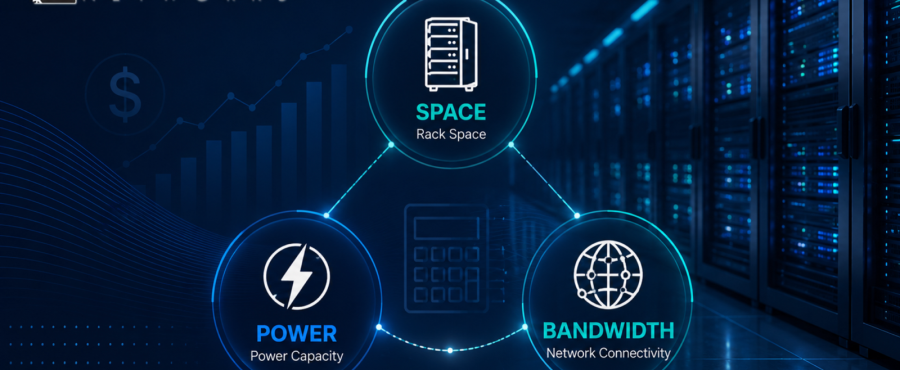
Space, power, and bandwidth form the core of most colocation pricing models, but they are not the only cost drivers. Buyers should also review setup fees, cross-connect charges, remote hands support, equipment receiving, installation support, managed networking, and disaster recovery options.
These costs are not automatically negative. Remote hands support can reduce the need to send staff to the facility for basic equipment tasks. Managed networking and disaster recovery support can also provide value when the colocation environment is part of a broader infrastructure strategy.
A pricing model should make clear what is included, what is optional, and what could change as usage grows. Hidden assumptions create budget friction later, especially when teams compare only the base monthly rate.
How Should Businesses Compare Colocation Pricing Models?
A useful colocation pricing comparison starts with the workload, not the quote. The business should understand what equipment is being deployed, how much space it needs, how much power it draws, what level of redundancy is required, how traffic behaves, and whether future growth is likely.
From there, each proposal can be reviewed for practical fit. Does the space model leave room for expansion? Is the power allocation a match the hardware profile? Does the bandwidth model reflect normal and peak traffic? Are cross-connects, support, and managed services clearly defined?
This approach helps teams avoid overbuying infrastructure that will sit unused or underbuying capacity that the environment cannot support efficiently.
Choosing a Colocation Model That Fits the Business
The best colocation pricing model aligns facility capabilities with business requirements. Space determines where the equipment lives. Power determines whether the environment can support the hardware safely and reliably. Bandwidth determines how effectively the infrastructure connects to users, applications, cloud services, and other network destinations.
Lightwave Networks provides colocation services designed to support businesses that need secure data center space, reliable infrastructure, and connectivity planning. If your organization is comparing colocation options, start with a deployment review that accounts for space, power, bandwidth, support needs, and future growth. Contact us today to discuss a colocation model built around your infrastructure requirements.
Colocation Pricing FAQs
What affects colocation pricing the most?
Colocation pricing is usually affected most by space, power, bandwidth, connectivity, redundancy, and support requirements. Different colocation facilities may structure those costs differently. This is why businesses should compare the full deployment model rather than only the base monthly rate.
Is colocation pricing based only on rack space?
No. Rack space is usually one part of the quote. However, colocation pricing also depends on power capacity, bandwidth, cooling needs, support, contract terms, and connectivity.
How should a business compare colocation pricing models?
A business should compare colocation pricing models by reviewing the full deployment profile. This includes space needs, power draw, bandwidth patterns, redundancy requirements, support needs, and future growth.
RELATED READINGS:
VPS vs. VDS vs. Colocation: How to Choose for Enterprise Growth

Understanding Liquid Cooling, Power, and Redundancy in Colocation Facilities
Modern infrastructure demands have shifted fast. High-density compute, AI training clusters, and advanced cooling strategies like liquid coolingare no longer edge cases. They are becoming baseline requirements. At Lightwave Networks, this shift is shaping how colocation facilities are designed to support GPU colocation, AI server colocation, and sustained high-performance workloads.
Understanding how these systems are designed, and more importantly, how they work together, is what separates a facility that simply houses equipment from one that is built to support modern, high-density infrastructure.
Why Power Infrastructure Is the First Constraint
Power availability is often the limiting factor in high-density deployments. A traditional rack might operate comfortably at lower kilowatt ranges. However, AI and GPU clusters can push far beyond that, especially in GPU hosting environments where multiple accelerators are stacked within a single footprint.
A facility designed for modern workloads must go beyond simple capacity. It needs structured power redundancy that can maintain uptime during failure events without introducing instability during load transitions.
A redundant power supply design typically follows models such as N+1 or 2N. In practice, that means there is at least one independent backup path for power delivery, or in higher-tier environments, a fully mirrored system that can carry the entire load if one path fails.
The difference becomes critical during real-world scenarios. A single power path failure in a non-redundant system can result in immediate downtime. In a properly designed data center power redundancy model, the failover is handled without interruption, assuming the load is balanced correctly and the infrastructure is maintained.
For organizations running latency-sensitive or compute-intensive workloads, this is not just a reliability feature. It is a performance safeguard.
Cooling Is No Longer Secondary to Power
Cooling used to be treated as a supporting system. That is no longer the case. As rack densities increase, cooling capacity and efficiency become just as important as power delivery.
Air cooling still plays a role, but it has limits. As heat output rises, air-based systems can struggle to maintain consistent temperatures across densely packed hardware. This is where liquid cooling becomes increasingly important for high-density colocation facilities.
Liquid cooling systems are designed to remove heat more efficiently by transferring it directly from high-output components. In liquid-cooled GPU environments, this can dramatically improve thermal stability, especially during sustained workloads like AI training or inference at scale.
However, not every environment requires full liquid cooling, and not every GPU setup benefits equally. Hybrid approaches are common, where air cooling handles baseline loads while liquid systems are deployed for high-density zones.
The key is not the presence of liquid cooling alone, but how it integrates with a broader cooling redundancy strategy.
What Cooling Redundancy Actually Looks Like
Cooling redundancy is often misunderstood as simply having extra equipment. In reality, it is about maintaining environmental stability during failure conditions.
A redundant cooling system might include additional chillers, backup pumps, or independent cooling loops that can take over if a primary system fails. The goal is to prevent temperature spikes that could trigger hardware throttling or shutdowns.
In high-density environments, even a short disruption in cooling can have cascading effects. GPUs and CPUs may reduce performance to protect themselves, which impacts workload completion times and overall system efficiency.
This is where system redundancy and system design intersect. A well-designed colocation facility anticipates these failure points and ensures that cooling transitions happen smoothly, without introducing thermal shock or uneven distribution.
Power and Cooling Must Be Designed Together
One of the most overlooked aspects of colocation design is the relationship between power delivery and cooling systems. These systems are deeply interconnected.
Higher power density increases heat output. Increased heat requires more aggressive cooling. More aggressive cooling demands additional power. Without careful planning, this creates a feedback loop that can strain both systems.
Colocation facilities built for modern workloads are designed with this relationship in mind. Power distribution units, cooling capacity, and airflow or liquid pathways are coordinated to support consistent performance across varying load conditions.
This becomes especially important in environments supporting GPU server colocation and AI workloads, where both electrical and thermal loads can fluctuate rapidly based on demand.
The Role of Redundant Systems in Uptime and Performance
Redundancy is often framed as a safeguard against downtime. That is true, but it also plays a role in maintaining consistent performance.
A redundant system is not just a backup. It is part of an active architecture that allows maintenance, load balancing, and failure handling without disrupting operations.
For example, a redundant power configuration allows one system to be serviced while the other continues to carry the load. The same applies to cooling systems that can rotate or share load across multiple units.
This flexibility becomes essential in environments where uptime requirements are strict, and workloads cannot be paused without consequence.
Liquid Cooling and the Future of High-Density Infrastructure
As AI workloads continue to scale, liquid cooling is becoming more relevant. It enables higher rack densities, improves thermal efficiency, and supports sustained performance under heavy computational loads.
That said, it introduces additional design considerations. Fluid management, leak detection, and system integration all become part of the operational model.
Not every facility is built to support this level of complexity. Those that typically position liquid cooling as part of a broader infrastructure strategy, not a standalone feature.
Bringing It All Together
Power, cooling, and redundancy are not independent systems. They form a single operational framework that determines whether a colocation environment can support modern infrastructure demands.
Colocation facilities that are designed to support high-density and AI-ready workloads focus on balanced power delivery, efficient and scalable cooling, and clearly defined redundancy layers that maintain both uptime and performance during real-world conditions.
When these elements are aligned, the result is an environment that is not just reliable but capable of supporting the next generation of computing. We build colocation environments designed to support these demands, including infrastructure optimized for AI server hosting, GPU hosting, and high-density deployments.
To evaluate how power delivery, cooling methods, and redundancy layers align with your infrastructure requirements, explore our colocation capabilities. Connect with a Lightwave Networks engineer today to review options built for high-performance workloads.
FAQ: Power, Cooling, and Redundancy in Colocation
What is a redundant system in a data center?
A redundant system in a data center is a backup or parallel component designed to maintain operation if a primary system fails. In colocation facilities, redundancy is commonly applied to power and cooling systems to support uptime and stability.
What is the advantage of having a redundant power supply?
The advantage of having a redundant power supply is that it allows infrastructure to continue operating during a power failure or maintenance event. This reduces downtime risk and supports consistent performance for high-density workloads.
Can you liquid cool any GPU?
Not all GPUs are designed for liquid cooling. Compatibility depends on hardware design, cooling infrastructure, and deployment requirements. Many high-density AI environments use liquid cooling to manage sustained thermal loads.
Why is cooling redundancy important in colocation facilities?
Cooling redundancy is important in colocation facilities because it helps maintain stable temperatures if a primary cooling system fails. This prevents thermal spikes that can reduce performance or trigger system shutdowns.